Org Mode Notes
Table of Contents
Plotting Data
- You need
gnuplotand thegnuplotemacs package installed - To plot the below example table from the manual use
C-c " g - This will open gnuplot and bring up an interactive graph
| Sede | Max cites | H-index |
|---|---|---|
| Chile | 257.72 | 21.39 |
| Leeds | 165.77 | 19.68 |
| Sao Paolo | 71.00 | 11.50 |
| Stockholm | 134.19 | 14.33 |
| Morelia | 257.56 | 17.67 |
Using Babel to Export Plots
- Worg: Org-babel-gnuplot
- Before this will work you need to enable
gnuplotin theorg-babel-load-languagesvariable
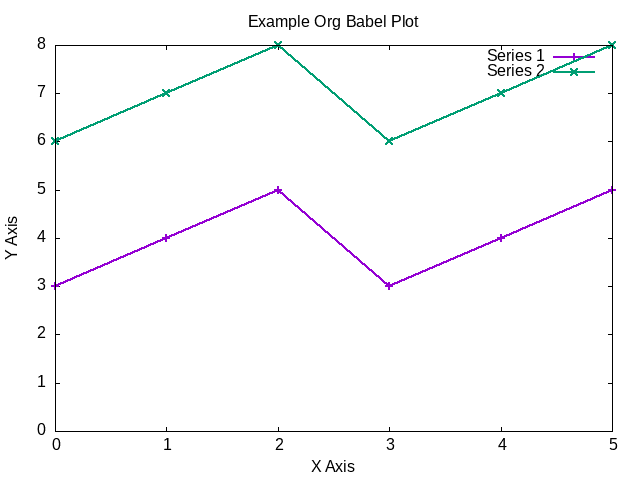
| x | y1 | y2 |
|---|---|---|
| 0 | 3 | 6 |
| 1 | 4 | 7 |
| 2 | 5 | 8 |
| 3 | 3 | 6 |
| 4 | 4 | 7 |
| 5 | 5 | 8 |
set title "Example Org Babel Plot"
set xlabel "X Axis"
set ylabel "Y Axis"
plot data using 1:2 with lp lw 2 title 'Series 1', \
     data using 1:3 with lp lw 2 title 'Series 2'
Editing the Structure
C-c C->can be used to demote (add more stars) to an entire subtree- Similarly
C-c C-<can be use to promote an entire subtree
Publishing
- This section walks through how this org repository is published into an html site
Appearance
Pretty Entities
- You can toggle pretty entities with
org-toggle-pretty-entites - This will render ordinals and exponents using superscripts
- If enabled these should have superscripts, 1st and xy
- This is an example of superscript syntax,
x^{3}
Graphviz
- Worg: Dot Source Code Blocks in Org Mode
- Grapviz DOT Language Documentation
- Rene Nyffenegger: Graphviz Examples
- Graphviz is a tool that compiles graph descriptions in the
dotlanguage into images - Org mode ships with
dotlanguage support, it just needs to be enabled withorg-babel-load-languages - For an emacs major mode that supports graphviz use graphviz-dot-mode
- Graphviz has a new layout engines: dot, neato, fdp etc.
- To set the layout engine use
:cmd <LAYOUT_ENGINE>in the header args of a graphviz, for example:cmd neatowill use the neato layout engine - The differences between the layouts is documented here.
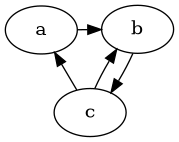
digraph {
    a->b;
    b->c;
    c->b;
    c->a;
}
LaTex
- To view the Embedded LaTex section of the manual execute:
(info "(org) Embedded LaTex")
- Worg: LaTex Source Code Blocks in Org Mode
- AucTeX is an Emacs major mode for editing LaTex
- You will need a texlive distribution (like
texlive-moston Arch Linux) installed on your system to access the LaTex programs - In order to export to SVG you need to have
inkscapeinstalled on your computer - Ensure that LaTex is added to the
org-babel-load-languages
Hello World
(a + b)^2 = a^2 +2ab + b^2

TikZ
PlantUML
Setup
- PlantUML: Integration with Emacs
- Install the
plantuml-modepackage from MELPA- With
straight.el(straight-use-package 'plantuml-mode)
- With
- Download the latest PlantUML jar file from the Github releases page
- Save it to a known location, for example
~/jars/plantuml-1.2022.1.jar - Set the emacs variable
org-plantuml-jar-pathto the location of the jar file
(setq org-plantuml-jar-path
      (expand-file-name "~/jars/plantuml-1.2022.1.jar"))
- Enable
plantumlin theorg-babel-load-languages
Example
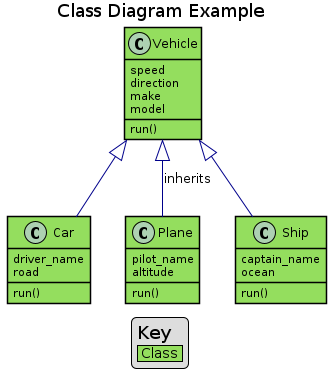
- The example diagram was borrowed from: Github mattjhayes: PlantUML Examples
@startuml
skinparam shadowing false

title Class Diagram Example

skinparam class {
    BackgroundColor #94de5e
    ArrowColor #darkblue
    BorderColor black
}

class Vehicle {
        speed
    direction
        make
    model
        run()
}
class Car {
    driver_name
    road
        run()
}
class Plane {
    pilot_name
    altitude
        run()
}
class Ship {
    captain_name
    ocean
        run()
}
Vehicle <|-- Car
Vehicle <|-- Plane : inherits
Vehicle <|-- Ship

legend
    <size:18>Key</size>
    |<#94de5e> Class |
endlegend
@enduml
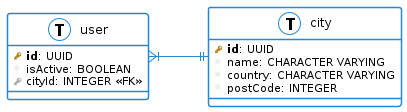
Database Example
@startuml
!define primary_key(x) <b><color:#b8861b><&key></color> x</b>
!define foreign_key(x) <color:#aaaaaa><&key></color> x
!define column(x) <color:#efefef><&media-record></color> x
!define table(x) entity x << (T, white) >>

left to right direction
skinparam roundcorner 5
skinparam linetype ortho
skinparam shadowing false
skinparam handwritten false
skinparam class {
    BackgroundColor white
    ArrowColor #2688d4
    BorderColor #2688d4
}

table( user ) {
  primary_key( id ): UUID
  column( isActive ): BOOLEAN
  foreign_key( cityId ): INTEGER <<FK>>
}

table( city ) {
  primary_key( id ): UUID
  column( name ): CHARACTER VARYING
  column( country ): CHARACTER VARYING
  column( postCode ): INTEGER
}

user }|--|| city

@enduml
Ditaa
Setup
- Customize the
org-babel-load-languagesvariable to enableditaa - Ensure that artist mode does not use tabs
(add-hook 'artist-mode-hook
          (lambda ()
            (setq indent-tabs-mode nil)))
- Customize the
org-ditaa-jar-pathvariable to the location where ditaa.jar is - Ensure that the openjdk is installed on your system
Example
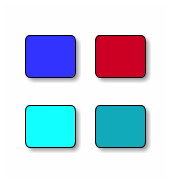
/----\ /----\
|c33F| |cC02|
|    | |    |
\----/ \----/

/----\ /----\
|c1FF| |c1AB|
|    | |    |
\----/ \----/